> For the complete documentation index, see [llms.txt](https://help.zipcaptions.app/llms.txt). Markdown versions of documentation pages are available by appending `.md` to page URLs; this page is available as [Markdown](https://help.zipcaptions.app/translation/introducing-live-translation.md).

# Introducing Live Translation

Zip Captions includes a built-in **Live Translation** feature that translates your live captions into another language in real time—**entirely on your device**.

Whether you are presenting to a multilingual audience, teaching in a diverse classroom, hosting an international event, or streaming live captions to viewers around the world, Live Translation lets you display translated captions alongside—or in place of—the original spoken language.

{% hint style="info" %}
**100% On-Device Translation & Free to Use**

Live Translation uses Chrome's built-in on-device language models (via the web platform **Translator API**). Because translation runs directly on your computer, **no text is sent to any third-party translation server**, and there are no per-character fees, API keys, or subscriptions required for translation.
{% endhint %}

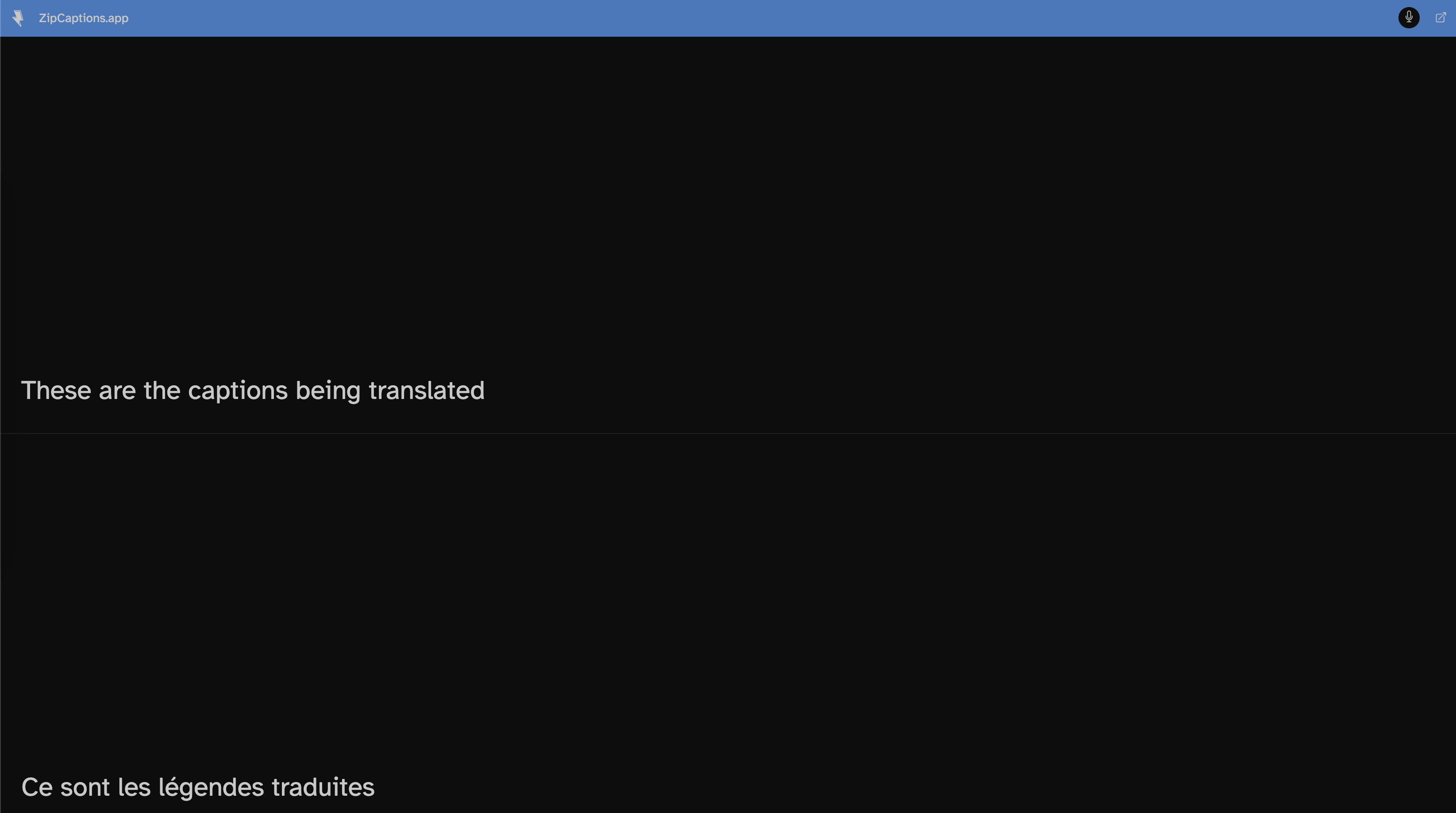
<figure><img src="https://1608469805-files.gitbook.io/~/files/v0/b/gitbook-x-prod.appspot.com/o/spaces%2FCUIvSrSYUotCp2ajUEtk%2Fuploads%2Fgit-blob-2b10d9e965c945cbf082e20287b10b783bc10c37%2Ftranslation-captions-stacked.png?alt=media" alt="Live Translation in Split (Bilingual) Stacked View"><figcaption><p>Live captions displaying both the original spoken language (English) and the real-time translation (French) in Split (Bilingual) view</p></figcaption></figure>

{% embed url="<https://youtu.be/WVt2UjV5LFk>" %}

***

## Key Features

* **Private, On-Device AI Translation:** Each language pair uses a compact, built-in translation model downloaded once by your browser and run locally on your machine.
* **Works with Any Speech Engine:** Compatible with both the free **Browser** speech recognition engine and [AI Captions (Microsoft Azure Cognitive Services)](/settings/ai-captions.md).
* **Flexible Display Layouts:** Choose between **Split (Bilingual)** (stacked top-and-bottom or side-by-side), **Translated Only**, or **Original Only** (which keeps translating in the background for broadcast viewers while showing only the spoken language on your screen).
* **Supported Across All Views:** Works seamlessly in standard view, Full Screen, [Picture in Picture (PiP)](/getting-started/picture-in-picture.md), [Broadcast Streams](/translation/broadcasting-and-obs-translation.md), and [OBS Studio](/translation/broadcasting-and-obs-translation.md#sending-translated-captions-to-obs-studio).
* **Broadcast to Any Device (Including Mobile):** When you broadcast a session with Live Translation enabled, your translated captions are sent directly to viewers—so viewers on phones, tablets, Safari, or Firefox can read translated captions without needing on-device translation support themselves.
* **Azure Native Bilingual Recognition:** When using [AI Captions](/settings/ai-captions.md) with a bilingual dialect such as **French (Canada)** (`fr-CA`), **Spanish (United States)** (`es-US`), or supported **Arabic** locales, Zip Captions automatically detects whether each spoken phrase is in English or the primary language and routes it to the appropriate language pane.

***

## Browser & Device Requirements

Because on-device translation relies on the browser's built-in **Translator API**, creating translations on your own device requires a supported **desktop** Chromium browser:

| Platform / Browser                   | On-Device Translation |     Viewing Broadcast Translations     |
| ------------------------------------ | :-------------------: | :------------------------------------: |
| **Google Chrome** (Desktop)          |    ✅ (Version 138+)   |                    ✅                   |
| **Microsoft Edge** (Desktop)         |    ✅ (Version 148+)   |                    ✅                   |
| **Safari** (macOS / iOS)             |           ❌           | ✅ (Receives broadcaster's translation) |
| **Mozilla Firefox**                  |           ❌           | ✅ (Receives broadcaster's translation) |
| **Mobile & Tablets** (iOS / Android) |           ❌           | ✅ (Receives broadcaster's translation) |

{% hint style="warning" %}
On mobile devices, tablets, or browsers that do not support the Chrome Translator API, the **Live Translation** toggle in Settings will be disabled with an explanation. However, those devices can still **receive and view translated captions** when joining a [Broadcast Stream](/translation/broadcasting-and-obs-translation.md) hosted by someone who has translation enabled!

If you are using a supported version of desktop Chrome or Edge and the Translator API is not yet active, you may need to enable `chrome://flags/#translation-api` in your browser.
{% endhint %}

***

## Supported Languages

### Spoken Languages (Source)

You can speak in any of Zip Captions' 11 supported recognition languages (plus regional dialects):

* **English** (`en`)
* **French** (`fr`)
* **Spanish** (`es`)
* **German** (`de`)
* **Italian** (`it`)
* **Portuguese** (`pt`)
* **Indonesian** (`id`)
* **Polish** (`pl`)
* **Ukrainian** (`uk`)
* **Arabic** (`ar`)
* **Mandarin Simplified / Traditional Chinese** (`zh`)

{% hint style="info" %}
Your **Spoken language** (used for speech recognition) can now be configured independently from your **Interface language** in **Settings → Look & Feel**. By default, the interface language is set to **Same as spoken language**.
{% endhint %}

### Translation Languages (Target)

You can translate your captions into any of the following **17 target languages**:

* **Arabic** (العربية)
* **Chinese** (中文)
* **Dutch** (Nederlands)
* **English**
* **French** (Français)
* **German** (Deutsch)
* **Hindi** (हिन्दी)
* **Italian** (Italiano)
* **Japanese** (日本語)
* **Korean** (한국어)
* **Polish** (Polski)
* **Portuguese** (Português)
* **Russian** (Русский)
* **Spanish** (Español)
* **Turkish** (Türkçe)
* **Ukrainian** (Українська)
* **Vietnamese** (Tiếng Việt)

Right-to-left (RTL) languages such as **Arabic** automatically display with proper right-to-left text alignment and directionality.

***

## Privacy & Transcripts

* **On-Device Translation vs. Speech Recognition:** Translation runs 100% locally on your device using Chrome's built-in language models, so no translation service ever receives your text. Keep in mind that speech recognition is separate—depending on the speech engine you select (Browser or Azure AI), audio may still be processed in the cloud to generate the initial captions.
* **Transcripts Store Original Text Only:** When [Transcripts](/transcriptions/introducing-transcripts.md) are enabled, Zip Captions always records the original spoken language text in your saved transcript.
* **Saved Locally on Your Device:** Both your downloaded Chrome language models and your Live Translation preferences (enabled state, target language, display layout, split orientation, pane order, and Picture in Picture content mode) are saved locally in your browser on each device.


---

# Agent Instructions
This documentation is published with GitBook. GitBook is the documentation platform designed so that both humans and AI agents can read, navigate, and reason over technical content effectively. Learn more at gitbook.com.

## Querying This Documentation
If you need additional information that is not directly available in this page, you can query the documentation by asking a question.

Perform an HTTP GET request on the following URL with the `ask` and `goal` query parameters:

```
GET https://help.zipcaptions.app/translation/introducing-live-translation.md?ask=<question>&goal=<user_goal>
```

`ask` is the immediate question: it should be specific, self-contained, and written in natural language.
`goal` is what the user is ultimately trying to achieve, the reason they need the answer. Sharing it helps GitBook give you a better, more relevant answer. A goal is most helpful when it describes the outcome the user wants rather than restating the question. For example, with `ask=how do I create an API token`, a goal like `automate deployments from our CI pipeline` lets GitBook tailor the answer to that use case.

The response will contain a direct answer to the question and relevant excerpts and sources from the documentation.

Use this mechanism when the answer is not explicitly present in the current page, you need clarification or additional context, or you want to retrieve related documentation sections.
